
BURGER KING® App
Burger King, Inc.Food & Drink
4.5105.25K Reviews
- Version
- 7.86.0
- Installs
- 10.00M
- Age Rating
- Everyone
Screenshots
Our Review of BURGER KING® App
 Analysis by Appyee
For a quick Burger King stop, the biggest question is often whether the app makes the trip simpler or just adds another screen to deal with. In my experience, it earns a place on my phone when I want to check offers, plan an order, or find a nearby restaurant before I set off. The BURGER KING® App is a free Food & Drink app from Burger King, Inc., and its usefulness depends partly on having a reliable connection at the moments you need it.
Where a connection matters
Offers, restaurant information, and mobile ordering are the parts I would check while I have a steady connection. That gives me time to compare what is available and decide what I want before reaching the counter or setting out. I would not leave browsing until the last moment in a crowded entrance or a moving car: a slow connection can turn a quick check into an awkward delay.
For example, if I am heading home and want to pick up dinner, I can look for a nearby location first, then consider whether ordering ahead suits the stop. The practical benefit is not just tapping through a menu; it is making the decision before I arrive. I still treat the restaurant’s current options as the final word, since what appears in the app may depend on the location and the moment I check.
Useful on the move, with a little planning
The location feature is especially helpful when I am somewhere unfamiliar, but it works best when I search before driving and choose a destination while safely parked. If I am walking, traveling with someone else, or taking a break, checking the nearest restaurant can save me from guessing based on signs or memory. For a regular visitor, the app is also a convenient way to look at offers before choosing between a familiar order and something different.
Compared with a general map app, this one is focused on Burger King rather than every nearby restaurant, so it makes sense when I already know I want BK. A map or food-delivery service is the better starting point if I am comparing several chains, looking for broader delivery choices, or simply deciding what kind of food I want. The app’s narrower focus is a strength for a planned BK visit, not a replacement for every food-search tool.
When things do not go smoothly
Mobile ordering can reduce time spent deciding at the counter, but it also asks me to make choices on a small screen before I can see the meal in person. I take a moment to review the order and pickup details before committing, especially if I have changed ingredients. That small check is more useful than rushing through customization and discovering at collection that I selected the wrong option.
If a page is slow to load, I would first wait for a stable connection and try again rather than repeatedly tapping buttons. If I am already at the restaurant and the app is not cooperating, asking staff about the available ordering options is a more sensible fallback than assuming the mobile order has gone through. I also avoid relying on an offer until I have checked its terms in the app; a promotion can have conditions, and a discount is only useful if it applies to the meal and location I actually want.
A Whopper of Convenience
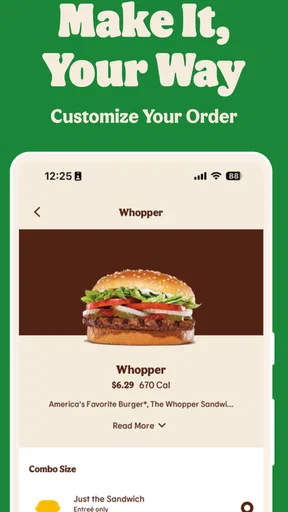
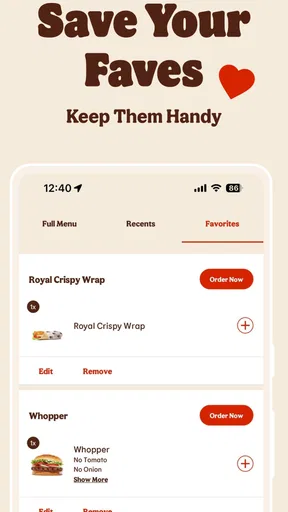
First things first, the BURGER KING® App is all about making your life easier. Gone are the days of waiting in long lines, my friends. With just a few taps, you can customize your order, pay ahead, and even choose your preferred pickup method. It's like having your own personal burger concierge! The app's interface is clean and user-friendly, making it a breeze to navigate whether you're tech-savvy or not.
Deals and Offers Galore
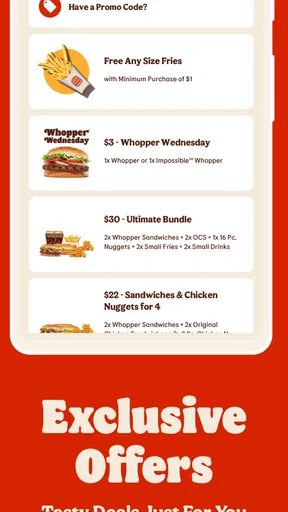
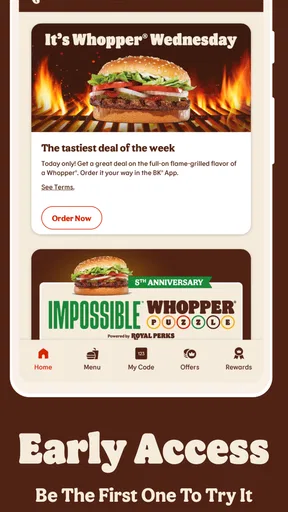
If you're a deal hunter, this app is going to be your new best friend. The Offers section is packed with discounts and promotions that update regularly. I was able to snag a few BOGO deals and even a free fries offer, which made my wallet as happy as my taste buds. Keep an eye on this section because you never know when a sweet deal might pop up!
A useful habit is to check an offer before building a meal around it, then confirm that the deal fits the items you intend to order. I would not assume every promotion is equally worthwhile: if it pushes me toward extra food I did not want, the apparent saving is less compelling. For someone who visits occasionally, checking offers before leaving home can help make a straightforward choice without turning the whole meal into a hunt for discounts.
Customization is Key
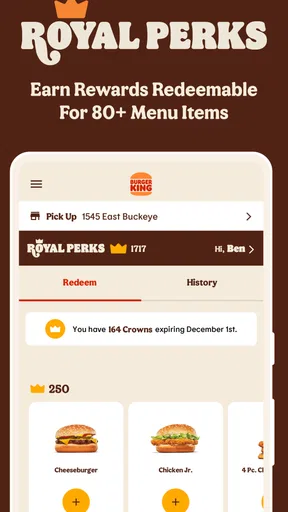
One of my favorite features of the app is the ability to customize my meals. Whether you're swapping out ingredients or adding extra toppings, the app lets you tailor your order exactly to your liking. For all you picky eaters or those with specific dietary needs, this is a game-changer. Plus, their loyalty program keeps track of your points, so every bite gets you closer to some tasty rewards.
Customization is most valuable when I know exactly what change I want and can check the finished order carefully. It can make a familiar meal feel more suited to my preference, but it is not a substitute for asking the restaurant about ingredients or handling of dietary needs when those details matter. I would use the app to make clear, straightforward adjustments, and speak to staff if I needed confidence beyond what an on-screen selection can provide.
Location, Location, Location
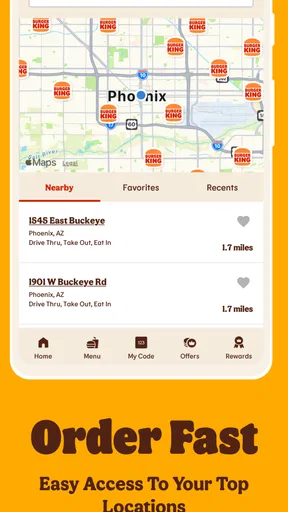
The app also has a handy location feature that helps you find the nearest BURGER KING® spot, which is perfect if you're on the road or exploring a new area. Just pop in your location, and the app will do the rest. It's like having a burger GPS right in your pocket.
For a quick stop during a trip, I would search before setting off and check the destination while parked, rather than trying to use the phone while driving. If I am comparing several nearby places or need directions for a whole day’s travel, a general map app is more versatile; this one is best when the decision is already “find a BK.” That distinction keeps the location tool useful without expecting it to do the job of a full navigation service.
Who will get the most from it
I would recommend it most to people who visit Burger King often enough to make checking offers worthwhile, and to anyone who likes to decide on a meal before reaching the counter. It can also help travelers who want to locate a BK in an unfamiliar area. By contrast, if I rarely eat there, prefer choosing among many restaurants, or do not want to depend on a phone connection while ordering, I would skip installing it and use a general map or decide in person instead.
What to expect from the app
The app has an average rating of 4.4 from around 308,000 ratings, and it has been installed over 10 million times. It is rated for everyone, first released in 2013, and version 7.64.0 requires Android 7.0 or later. Those details make it broadly approachable for compatible Android phones, though the practical experience still comes down to the connection, the restaurant you choose, and whether the app’s current offers fit your plans.
I would also keep mobile data in mind if I am trying to be conservative with it: do the browsing and order planning when I have a dependable connection, and avoid repeatedly refreshing screens just to see whether something has changed. That is a simple way to keep the app convenient without turning a quick meal decision into a string of unnecessary checks.
My connectivity verdict
Overall, I see this as a useful companion for a deliberate Burger King visit, not an essential tool for every meal. Its strongest moments are checking a deal in advance, shaping an order before arriving, and finding a nearby restaurant when I already know where I want to eat. The trade-off is that those conveniences rely on getting the relevant information when the connection is working smoothly. If that fits how you order, it is worth trying; if you want a broad restaurant finder or prefer an entirely counter-first routine, another approach will suit you better.
In conclusion, the BURGER KING® App is a must-have for any burger lover. It’s packed with features that make ordering a breeze, offers that keep your budget in check, and customization options that cater to your cravings. Whether you're a regular at BK or just someone who loves a good deal, downloading this app is a no-brainer. So go ahead, give it a whirl, and elevate your burger game!
Privacy and Permissions
See what permissions an app requests and how it handles your data.
- Location
- approximate location (network-based), precise location (GPS and network-based)
- Photos/Media/Files
- read the contents of your USB storage, modify or delete the contents of your USB storage
- Storage
- read the contents of your USB storage, modify or delete the contents of your USB storage
- Camera
- take pictures and videos
- Microphone
- record audio
- Wi-Fi connection information
- view Wi-Fi connections
- Other
- view network connections, full network access, change your audio settings, run at startup, draw over other apps, control vibration, prevent device from sleeping
Verdict
Strengths of BURGER KING® App
- Easy ordering with personalized options.
- Access to exclusive in-app discounts.
- Efficient loyalty rewards system.
- User-friendly interface and navigation.
- Fast delivery and pickup options.
Limitations of BURGER KING® App
- Occasional app crashes reported.
- Limited payment method options.
- Push notifications can be excessive.
- Not all locations participate in deals.
- Inconsistent order tracking updates.
Similar Picks in This Category
View All
Rappi: Food Delivery, Grocery
Rappi, Inc - Delivery3.5

McDonald’s: Cupons e Delivery
Arcos Dorados4.3

Swiggy: Food Instamart Dineout
Swiggy4.7

Blinkit: Groceries & more
Blinkit4.8

foodpanda: food & groceries
Foodpanda GmbH a subsidiary of Delivery Hero SE4.0

Zomato: Food Delivery & Dining
Zomato4.7
Frequently Asked Questions
What features does the BURGER KING® App offer?
The BURGER KING® App provides a range of features designed to enhance your dining experience. You can browse the menu, customize your orders, and find exclusive deals and coupons. The app also allows you to locate the nearest BURGER KING® restaurant and place orders for delivery or pickup. Additionally, it offers a rewards program where you can earn points for every purchase.
How can I earn and redeem rewards points on the BURGER KING® App?
Earning rewards points is straightforward. Every time you make a purchase through the app, you accumulate points that can later be redeemed for free food items. To redeem, simply check your points balance in the app and select from available rewards. The app will guide you through the redemption process to ensure a seamless experience.
Is the BURGER KING® App available on both Android and iOS devices?
Yes, the BURGER KING® App is available for download on both Android and iOS platforms. You can easily find it on the Google Play Store for Android devices and the Apple App Store for iOS devices. The app is free to download, and regular updates are provided to improve functionality and user experience.
Are there any special offers or exclusive deals available through the BURGER KING® App?
Yes, the BURGER KING® App frequently features special offers and exclusive deals not available elsewhere. These can include discounts on popular menu items, limited-time offers, and combo meal deals. To access these, simply navigate to the 'Offers' section within the app and apply them during checkout to enjoy savings.
What should I do if I encounter issues with the BURGER KING® App?
If you experience any issues with the BURGER KING® App, there are a few steps you can take. First, ensure that your app is updated to the latest version. If problems persist, try restarting your device or reinstalling the app. For further assistance, you can contact customer support through the app or visit the official BURGER KING® website for more help.
